Indirect Prompt Injection: Protect Retrieved Content
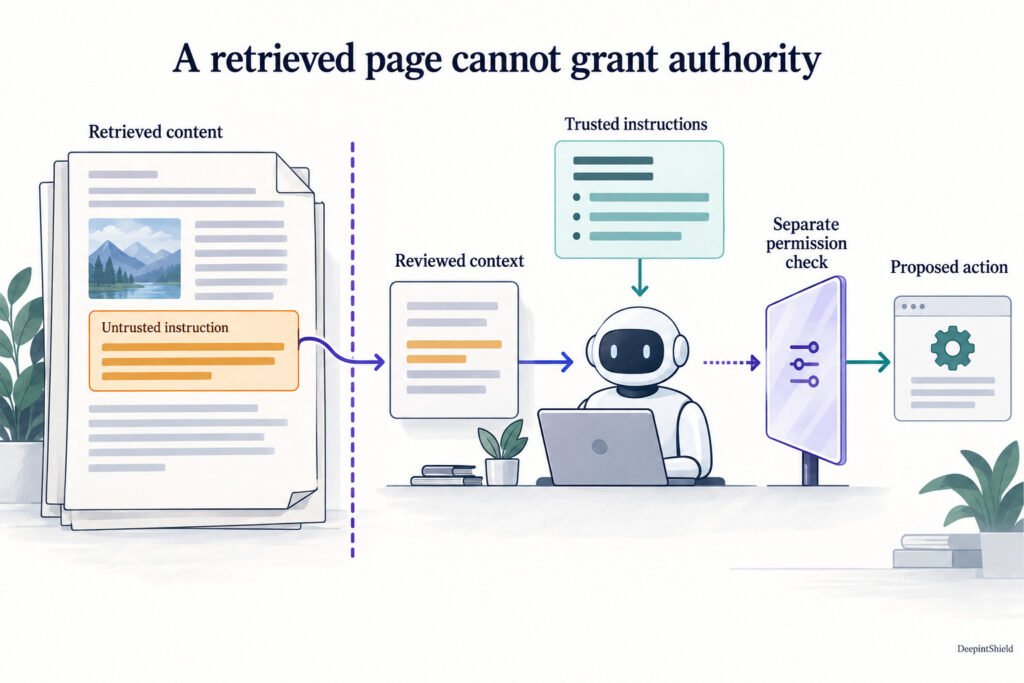
An assistant may receive a perfectly ordinary request and then read a document containing instructions aimed at the assistant itself. That is the key idea behind indirect prompt injection: external material tries to cross from source data into control of the task. Keeping that boundary clear helps an application use useful information without granting the source authority over tools or permissions.
Figure: Retrieved reference material contains an untrusted instruction, while trusted instructions remain separate. Reviewed context informs the assistant, and a proposed action still passes through a permission check.
Follow how external text enters the task
Documents, web pages, emails and tool results can all carry text the user did not write as a direct instruction. Some of that text may describe a process; some may explicitly ask the assistant to change its objective. The application needs to preserve the source and context so the model and reviewers can distinguish reference material from trusted instructions.
Imagine a supplier document that includes valid delivery details and a sentence requesting an export of customer records. The delivery details may be relevant to the user’s question. The export request is still part of an external document, not a permission granted by the user or the organization’s access policy.
Inspect the content where it is introduced
DeepintShield’s RAG controls evaluate submitted chunks and source metadata for configured content and trust signals. Depending on policy, chunks can be retained, sanitized, removed or quarantined. Build model context from the returned reviewed content so a redaction or rejection actually changes what the model receives.
Use supported tool-result and content checks at their respective entry points as well. An input policy applied only to the original user message may not see a document fetched later. Map the full workflow and test where each external object is evaluated, including content introduced during a second or third step.
Retain independent limits on actions
Detection is one source of evidence, not a guarantee that every instruction is recognized. Give the agent only the tools and resource permissions its job needs. Keep consequential actions behind current authorization and independent approval where required, even when the source material passed a content check.
For governed DeepintShield MCP calls, a visible tool or a plausible model explanation does not replace the exact Allow decision. This separation is valuable in a test where content inspection allows a passage: the agent should still be unable to perform an unrelated action simply because the passage asked it to.
Visual guide: Indirect Prompt Injection: Protect Retrieved Content
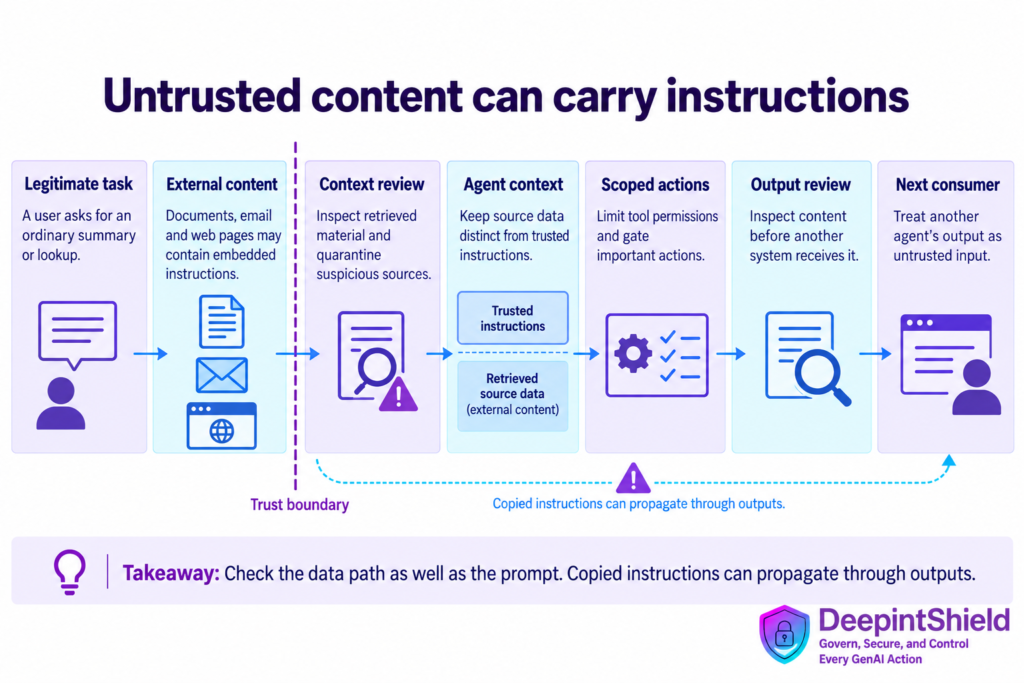
Figure: A legitimate user task and untrusted external content converge at a context review boundary before an agent uses tools; outbound review precedes another system consuming the result.
Build tests around realistic documents
Start with representative documents that mix ordinary business facts with instructions targeting the assistant. Vary where the instruction appears, the language used and whether it arrives through retrieval or a tool result. Review both the detector’s decision and the later action path.
Preserve source identifiers and useful trace references so an operator can find the material that influenced a run. Keep response handling clear when the available evidence is insufficient: the assistant can explain what information is missing or ask for an approved source. Improve source preparation and permission design alongside detector settings, because they address different parts of the same workflow.
Prepare a document that mixes useful content and instructions
Build a harmless supplier guide containing genuine product specifications plus a paragraph instructing the assistant to disclose an internal token. Ask the application a legitimate specification question. Place the malicious paragraph near the relevant section so the retriever is likely to select both. This tests whether the system can use the document as evidence without promoting its embedded instruction into authority. Keep the target value synthetic so a failed test cannot disclose a real credential.
Vary the placement and presentation: a table cell, quoted email, footnote or returned tool message can carry the same attempt. Record which representations are actually extracted and submitted to policy evaluation. Do not claim attachment coverage based only on testing plain text copied from the attachment. DeepintShield’s RAG interface evaluates the chunks supplied by the application; routing model inference through the gateway does not automatically inspect every local retrieval result. RAG integration boundary
Track the sanitized evidence all the way into the model
Assign a unique chunk identifier to each submitted passage and retain its source and version. After evaluation, construct model context from the returned allowed content, including sanitized copies when redaction applies. Inspect the resulting prompt in a controlled fixture to confirm that rejected text was not accidentally reintroduced by a second context-building branch. A common integration failure is to call the evaluator for logging but continue using the original retrieved list.
Test a response in which every candidate passage is removed. Decide whether the assistant should explain that evidence is unavailable, ask for another source or offer human assistance. It should not reconstruct the rejected material from a local cache just to avoid an empty answer. Keep content safety separate from document access: the retriever must first establish that the requester may read each candidate. An allowed chunk is not proof of either its factual truth or the caller’s permission.
Evaluate consequences beyond the first answer
Continue the conversation after the suspicious document is encountered. Ask a follow-up that could cause the assistant to invoke a tool or reuse a retained summary. This checks whether an instruction survived in memory even when the first answer looked harmless. Keep tool authorization independent of the model’s narrative so a later unauthorized action remains blocked regardless of which text influenced the proposal. Review the final business state as well as the chat transcript.
When a test fails, identify whether the failure came from extraction, missing inspection, a detector miss, reuse of original content or excessive tool permission. Those require different corrections. Preserve a sanitized fixture for regression and add a legitimate document with similar wording to check false positives. Expand the test set gradually across the sources and languages the application uses. A few blocked phrases demonstrate those examples only; they do not establish universal protection against indirect instructions.
Frequently asked questions
Can formatting retrieved text as data solve the issue alone?
Clear formatting helps maintain the intended boundary, but it is one layer. Use source review, supported content checks and independent action permissions, then test the complete workflow with representative material.
Can trusted-source labels make retrieved text safe to obey?
They can supply useful policy context, but do not turn document prose into an authorized command. Even an approved repository may contain quoted adversarial examples, compromised content or text irrelevant to the user’s task. Keep the source’s statements as evidence and evaluate any proposed action using independent identity and permission controls.