Multi-Tenant LLM Platforms: Workspace Access Boundaries
A shared LLM platform becomes easier to operate when teams can reuse infrastructure while keeping their configuration and records appropriately separated. Workspace access boundaries are central to that design. The important question is not only which workspace appears in a selector, but how the authenticated scope follows every request, stored object and background operation.
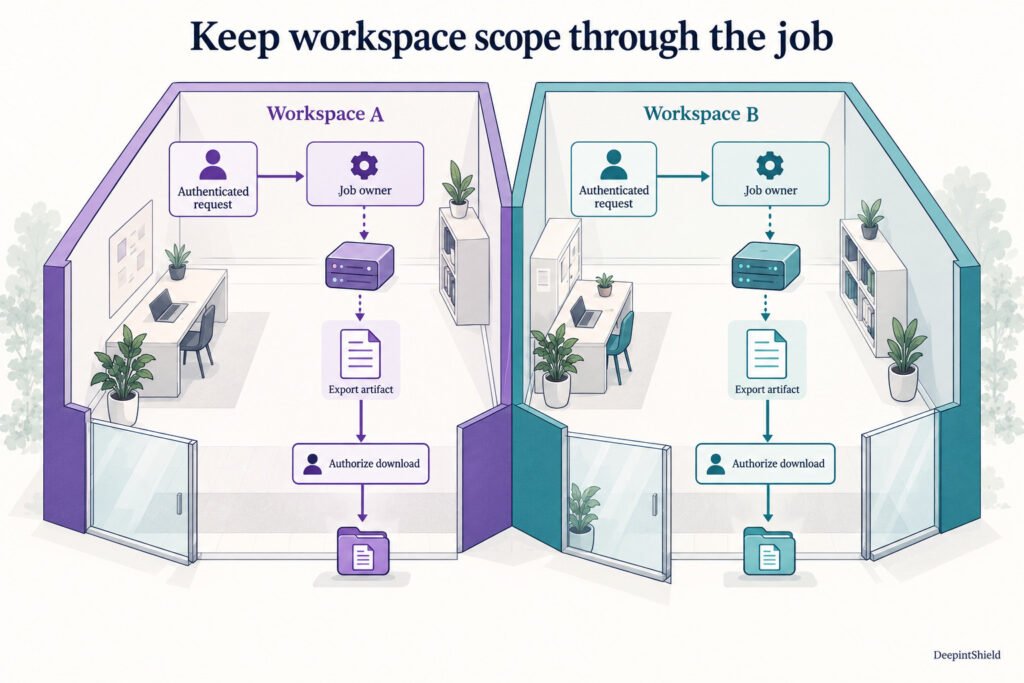
Figure: Parallel customer workspaces carry scope through authenticated requests, background jobs and exported artifacts. Download authorization checks the current caller against the stored owner.
Separate account structure from access decisions
Organizations, tenants and workspaces can help describe who owns an environment and how teams organize their work. Resource access still needs explicit server-side checks. A page label or client-supplied workspace value should not determine whether someone can read another team’s keys, policies or traces.
DeepintShield documents workspace-scoped configuration and relationship authorization, alongside roles for viewing and managing platform resources. Review which permissions the actual user or service receives. For example, someone reviewing request evidence may need log access without the ability to edit provider credentials or publish a policy.
Carry the same boundary across the workflow
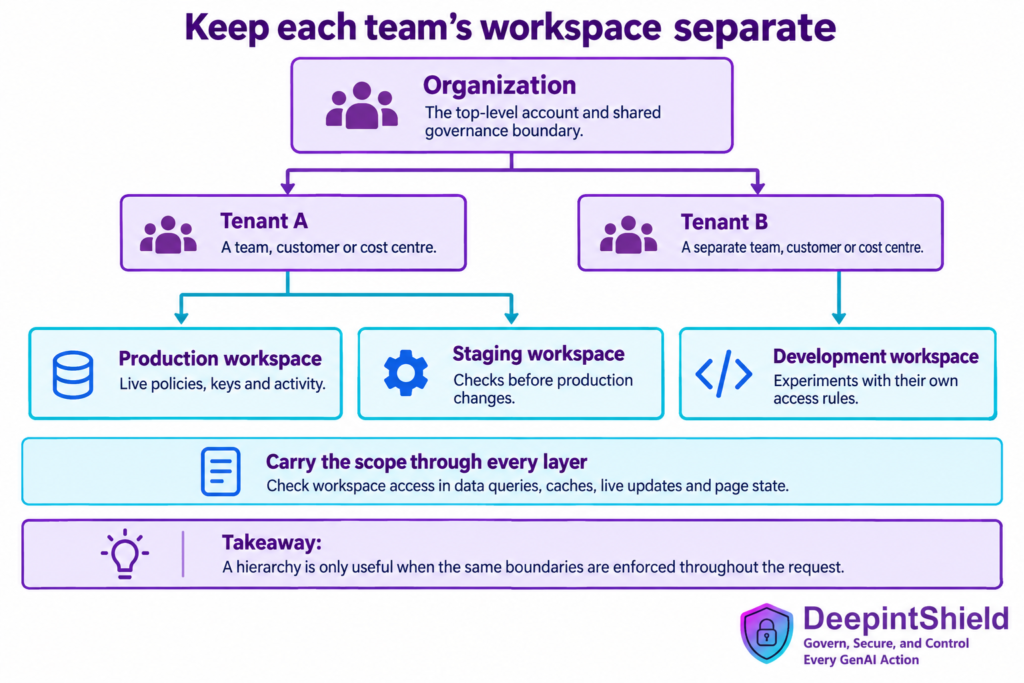
Consider two customer workspaces using the same model provider. Each request must resolve to the intended workspace and applicable Virtual Key configuration. A stored response identifier, cache entry or background job should retain the relevant ownership and routing context when it is accessed later.
For governed agent actions, DeepintShield’s canonical relationship checks use the exact workspace. A matching tool name in another workspace is not a substitute for the current tool and resource relationships. Test both the initial call and any follow-up operation that retrieves or changes its output.
Keep caller-specific answers separate within a workspace
Workspace isolation is not always the narrowest boundary an application needs. Several users may share a workspace or Virtual Key while receiving personalized answers. Response caching therefore needs the documented caller or context scope as well as the broader workspace separation.
The same distinction applies to retrieval. A workspace-scoped RAG request does not establish document permission for every user in that workspace. The application or retriever must authorize documents before submitting content for RAG policy evaluation. Source labels and policy-selection fields describe context; they do not create a user’s right to read a document.
Visual guide: Multi-Tenant LLM Platforms: Workspace Access Boundaries
Figure: Hierarchy of an organization, two tenants and production, staging and development workspaces, above a checklist of scoped policies, keys, queries, caches and live updates.
Test transitions as well as steady access
Use two workspaces with deliberately different policies and sample data. Verify that a caller from the first cannot read or change the second’s resources, then repeat in the other direction. Check cached answers, stored objects, logs, live updates and background jobs, rather than only the main dashboard page.
Also test changing the active workspace, changing a role and revoking a credential. The interface should reload the relevant state while the server continues to enforce access. Keep budget grouping separate from this review: Virtual Keys and attached team or customer groups have their own documented budget model, which is not an automatic spending hierarchy for every account container.
Trace a customer export across the boundary
Imagine a shared assistant that prepares a monthly export for two customer workspaces. The initiating request correctly authenticates to the first workspace, but export generation continues in a worker after the browser disconnects. The worker needs an authoritative workspace identifier and the initiating service context in its job record. Reading the currently selected workspace from a global setting would make the result depend on another user’s activity. This example extends the access review beyond a successful dashboard check to the lifecycle of the resulting file.
Inspect the export download separately. A difficult-to-guess identifier can reduce accidental discovery, but possession of that identifier should not establish permission. Check the stored owner and current caller before returning the file, and repeat those checks for status, cancellation and deletion routes. An administrator legitimately operating across workspaces needs an explicit administrative path with suitable evidence. Do not make ordinary customer calls inherit that privilege merely because the background worker uses an administrative database connection.
Design tests that expose scope confusion
Build fixtures with the same document title, tool name and application label in both workspaces, but different harmless marker values. A test based only on unique names can pass while a lookup accidentally omits workspace scope. Try the other workspace’s resource identifier through every relevant route, then inspect the response body, status, logs and notification stream for disclosure. These are application test recommendations; they are not a claim that the gateway automatically inventories or exercises all surrounding services.
Within one workspace, use two customers who share a knowledge source but have different document permissions. Verify permission filtering before retrieval content reaches the model and include an answer-cache reuse attempt. DeepintShield’s RAG documentation describes source policy context, which must not be mistaken for individual document authorization. Record the expected rule for each fixture so a blocked query cannot be credited as successful isolation if the same configuration also blocks every legitimate customer.
Handle revocation and investigation deliberately
Exercise a role removal while a browser session, queued job and generated artifact are still present. Define whether the job should finish, stop or require a renewed decision, and enforce that choice in the component responsible for execution. A past successful login is insufficient evidence for every later privileged operation. For governed tool execution, use the exact workspace and current relationship decision described in the relationship authorization guide. Keep console administration and agent-action relationships distinct in the runbook.
When an unexpected cross-scope result appears, preserve the request and resource identifiers, stop the affected access path, and determine which operation first lost its scope. Investigate downstream caches, exports and notifications as well as the original response. Correcting a query does not withdraw files already delivered. Recovery planning should therefore include the application’s established incident process and a repeatable reproduction test. Resume the affected operation only after both forbidden and permitted fixtures behave correctly across the relevant replicas and worker paths.
Use the harmless workspace markers in notifications and generated filenames as well as response bodies. A protected document can still be disclosed indirectly through a job label or preview. Include those surrounding surfaces in the export workflow’s access review and regression fixtures.
Frequently asked questions
Does a separate workspace provide every user-level permission?
No. Workspaces establish one scope. Applications may also need individual document permissions, narrower cache scopes and specific tool or action relationships within that workspace.
What should a workspace isolation test prove?
It should demonstrate that permitted users can complete their intended workflow and that other workspaces cannot read, change or infer its protected resources. Include background jobs and stored outputs, then test narrower user permissions within a workspace. Passing one API request does not establish coverage of every operation or every deployment configuration.