Virtual API Keys: Budgets, Model Access and Routing Boundaries
An application credential should express which AI services the application can use and how its usage is governed. Virtual API keys make that boundary easier to manage without exposing provider credentials throughout the codebase. This guide combines model permissions, budgets, rate limits and routing rules into one configuration review. DeepintShield documents independent limits at relevant levels of the budget hierarchy, so routing to an eligible model does not remove another applicable usage check. Start with one application owner and the smallest necessary provider and model grants. Then exercise normal usage, exhausted limits and alternative routes. Keep the expected outcome of each case beside the observed accounting so access and cost controls can be understood together.
What you will learn
- A virtual key ties an application to explicit model access and ownership.
- Routing eligibility and budget availability are separate checks.
- Test denied routes and exhausted limits alongside successful requests.
Give each application scoped access
Give the key a specific job
Create a key for a defined application or workload and record the environment it serves. A reporting service and a customer-facing assistant may use the same provider while needing different model permissions, limits and policy bindings. Separating their gateway credentials makes those decisions easier to review.
DeepintShield supports provider and model filtering, optional restrictions to configured provider keys, and active or inactive key state. Use the documented credential carrier for the deployment’s authentication mode. Keep the secret value in the application’s secret configuration, rather than source code, screenshots or shared examples.
Understand the associated budgets
Virtual Key budgets are independent limits. A key can be attached to one team, one customer or neither; a team can have its own customer association. Applicable budgets are checked according to that configured relationship. Do not describe them as an automatic organization-to-tenant-to-workspace spending chain.
Request and token limits serve a different purpose from cost budgets: they regulate usage over a time window. The dedicated budget guide also documents provider-configuration controls within a key. Review the effective deployed settings and the structured response when a limit is reached, so the application can provide a useful next step.
Keep inference access separate from agent permissions
A key that can send model requests does not automatically grant an agent permission to update a business record. With Agentic authorization enabled, current MCP execution revalidates the key and agent binding alongside registered action metadata, workspace relationships, optional context and approval state.
Likewise, limiting the tools visible to a key is useful discovery control, but an actual governed call still needs its current authorization decision. Test the read and update operations separately for a service that uses both. This makes the difference between model access and action authority clear to the application owner.
Practice rotation and deactivation
Maintain a list of the clients that use each key. Distribute a replacement securely, update those clients and verify their requests before completing the credential change. Then confirm that the retired value no longer permits subsequent requests under the intended deployment behavior.
Test propagation across replicas when emergency deactivation matters, and inspect the operational evidence rather than assuming that a changed interface badge proves every route has refreshed. Keep provider credentials protected as a separate layer. Virtual Keys simplify application access management, while upstream accounts and gateway administration still need their own access review.
Model a key lifecycle for a document summarizer
A document summarizer illustrates why ownership matters. Its development instance needs a modest allowance and a limited model set; its production instance needs separate credentials, an accountable team and predictable handling when access is unavailable. Create a written record containing the application owner, environment, expected provider routes and rotation contact. This record helps an operator distinguish a legitimate traffic increase from a forgotten test client. It also makes deactivation targeted instead of forcing every application sharing an upstream provider account to change at once.
Choose the association that represents the actual spending responsibility. A project sponsored by a customer might use a customer-associated key, while an internal service might attach to a team. Review any team-to-customer relationship before interpreting aggregate usage. The Virtual Keys guide documents these associations and access filters. Avoid encoding an imagined hierarchy into automation: a workspace name is not evidence that a corresponding budget exists or that its value participates in admission checks.
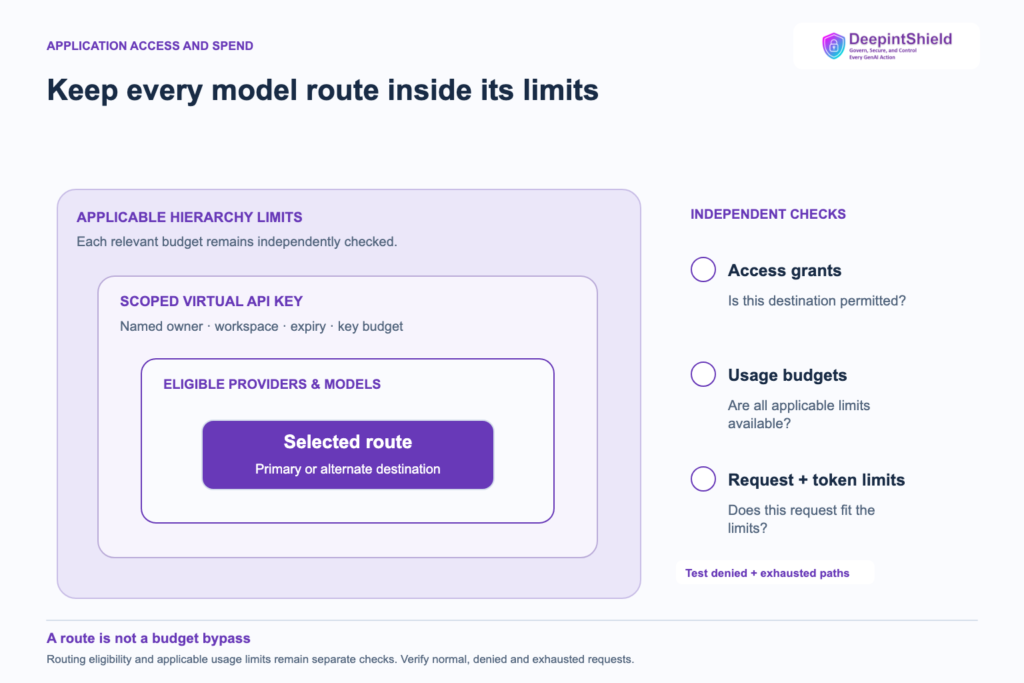
Figure: A selected model route sits inside model eligibility, a scoped Virtual API Key and applicable hierarchy limits. Independent grant, budget and rate-limit checks remain required for both primary and alternate routes.
Set independent budgets and limits
Give each workload an accountable budget
Create a Virtual Key for the job or application and record its owner, purpose and approved model routes. Separate a background batch from an interactive assistant when they have different usage expectations. That separation makes it easier to identify a change in demand and adjust one workload without changing every application.
DeepintShield checks applicable budgets independently: provider configuration where present, the Virtual Key, and attached team or customer budgets according to the configured relationship. Each applicable limit must permit the request. A key can attach to a team, a customer or neither; these associations should be visible in the budget review.
Distinguish admission from final accounting
A budget check governs whether further work is admitted based on the implemented accounting state. It is not a promise that the eventual provider invoice will equal the configured cap exactly. Requests already in progress, concurrent traffic and the timing of usage reports can affect the final amount.
The dedicated DeepintShield budget guide illustrates usage being updated after a request, with subsequent requests blocked once applicable limits are exceeded. Test that behavior on the deployed path. Include a concurrent burst, an unexpectedly large response and a model whose price coverage needs review. Keep enough operational headroom for what the test demonstrates.
Use rate limits and model access for different goals
Request limits regulate the number of calls over a period, while token limits regulate reported token usage. Model and provider permissions define which routes the application may use. These controls complement a cost budget because workload shape can change even when the spending allowance stays the same.
For the nightly job, test a normal run, a larger input set and repeated retry attempts. Check the structured response when a limit prevents a call, and ensure the application stops or reschedules appropriately. A retry policy should recognize a budget condition rather than repeatedly submitting the same work without a plan.
Reconcile usage and improve admitted work
Review gateway cost records with the provider’s billing information and keep unknown pricing coverage distinct from a confirmed zero charge. Investigate changes in request volume, context size, model choice or retries with the application owner. Confirm that any alerts reach someone who can act, while keeping admission checks effective independently of notification delivery.
Then evaluate optimizations for the work you choose to admit. Caching, context selection and model routing can improve efficiency when they preserve task quality. Their measured value complements budgets; it does not replace them. Keep the configuration and comparison results so the next review starts from evidence.
Plan a batch workload around admitted work
Imagine a nightly job that summarizes support tickets. It usually processes a predictable queue, but a backlog and repeated provider timeouts can increase both volume and retries. Assign the job its own accountable Virtual Key, set the applicable limits, and define which tickets can wait until the next run. Track completed useful summaries as well as submitted requests. This makes a spending review about delivered work and backlog management, instead of treating every charged request as equally valuable or every rejected request as an unexpected incident.
Before enabling the full queue, estimate a range using representative input and output sizes, then compare that range with observed usage. Keep the estimate explicitly separate from an admission guarantee. The budget and limits guide describes independent checks and usage accounting, so test the deployed behavior with requests already in flight. If a strict business exposure threshold matters, choose conservative application concurrency and headroom based on measured behavior rather than assuming a configured budget reserves every possible future token cost.
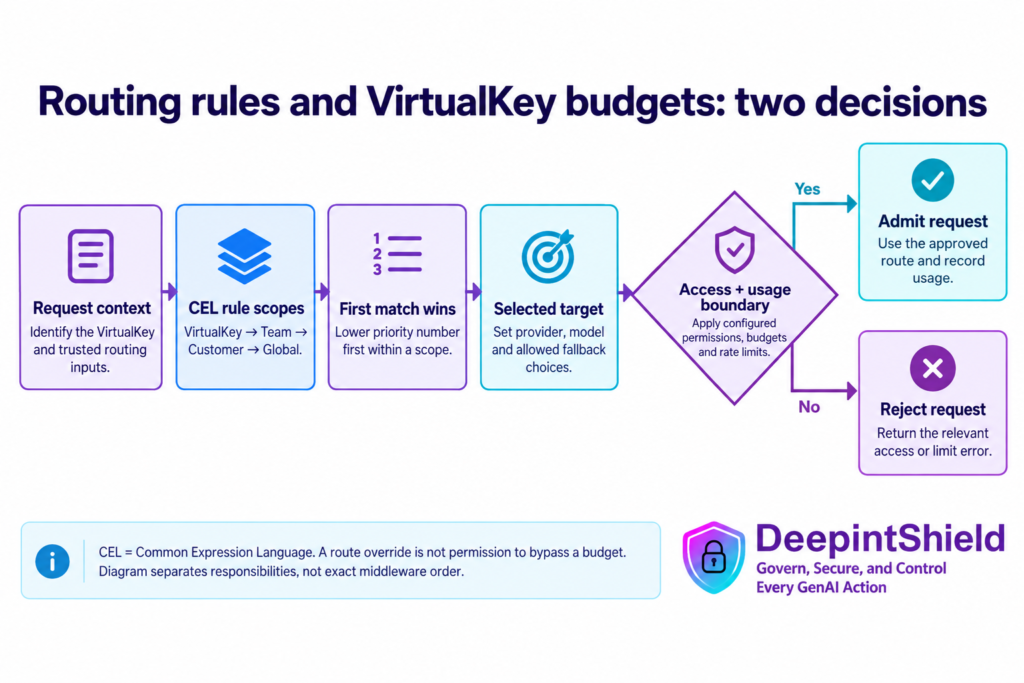
Figure: Request identity leads to ordered CEL scopes, first match, selected targets and admission boundaries, then provider or rejection.
Apply routing rules within scope
Make rule precedence easy to explain
DeepintShield routing rules use CEL expressions over supported request and organization context. Rules run before governance provider selection. The first matching rule wins, so a rule’s position can matter as much as its expression.
The documented scope order is Virtual Key, Team, Customer and then Global. Within a scope, lower priority numbers run first. If no rule matches, the request keeps its provider and model and follows normal routing. Use narrow rules for a particular workload and review broader defaults for unintended overlap.
Trust the inputs that guide routing
A rule may inspect supported headers, model information, request type, parameters or capacity context. Decide which values the application is allowed to supply and which should come from trusted infrastructure. A routing header should not become a way for callers to claim an authority they do not have.
For example, a service may route a classification task differently from a long-form answer. Test both request types with an authorized Virtual Key and verify the served route. Keep the expression readable enough that an operator can explain why one request matched and another continued to the default.
Check every applicable budget independently
Budget levels can include provider configuration, Virtual Key, Team and Customer. Each applicable budget must pass. The same recorded cost contributes to each relevant level’s usage; that is hierarchical accounting rather than separate charges for the same request.
Request and token rate limits apply at the Virtual Key and provider configuration levels. Teams and Customers do not add their own rate limits in this documented hierarchy. A Virtual Key attaches directly to a Team, a Customer or neither, so confirm the actual relationship when explaining which budgets apply.
Test the boundary as well as the happy path
Exercise a matching rule, a request with no match and a provider that has reached a configured limit. Check the selected route and the resulting usage record. A provider excluded by governance may leave another eligible provider available, depending on the routing configuration.
Budget checks use recorded usage and can permit a request that takes a balance past its threshold before later requests are blocked. Do not describe this as an exact prepaid reservation for an unknown final response cost. If the application needs an additional business spending boundary, design and verify that control explicitly. Keep usage reviews tied to the same workspace, key and period as the rule tests.
Frequently asked questions
Can one Virtual Key be attached to both a team and a customer?
The documented key association is exclusive: one team, one customer or neither. A team can itself belong to a customer, so review that relationship when interpreting applicable budgets.
Does a routing match grant access to every model?
No. Route selection should be reviewed alongside the Virtual Key’s permitted provider and model scope and the applicable governance checks. An expression is not a replacement for access configuration.