Deployment
AI gateway deployment options: managed, hybrid or self-hosted
There are three AI gateway deployment options for DeepintShield: a fully managed cloud, a hybrid model with the data plane in your VPC, and a fully self-hosted install with an air-gapped option. The platform is the same in each; your choice decides who operates the control plane and data plane, and where prompts and keys are stored.
- Same platform in all three modes
- Hybrid and self-hosted: no data leaves your environment
- Start managed, move later
Three AI gateway deployment options
Pick the mode that matches your data rules and your team. Each page shows the architecture, the install steps and the plan.

Fully Managed Cloud
DeepintShield hosts and runs everything. Sign up, change one base URL and start on the free Developer plan.
Explore the managed cloud

Hybrid Cloud
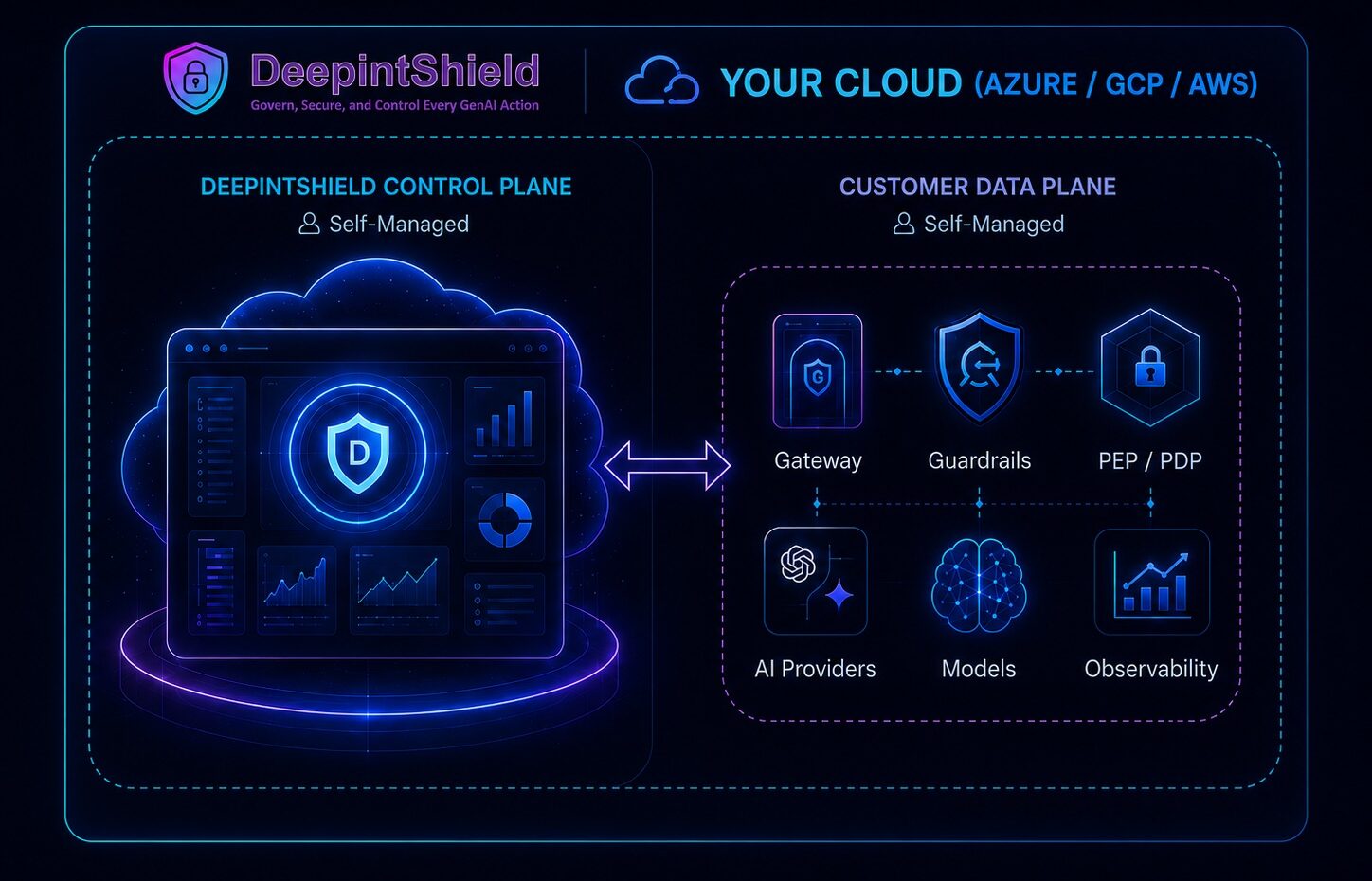
We run the control plane; you run the data plane in your VPC. Prompts and keys stay with you.
Explore hybrid
Self-Hosted
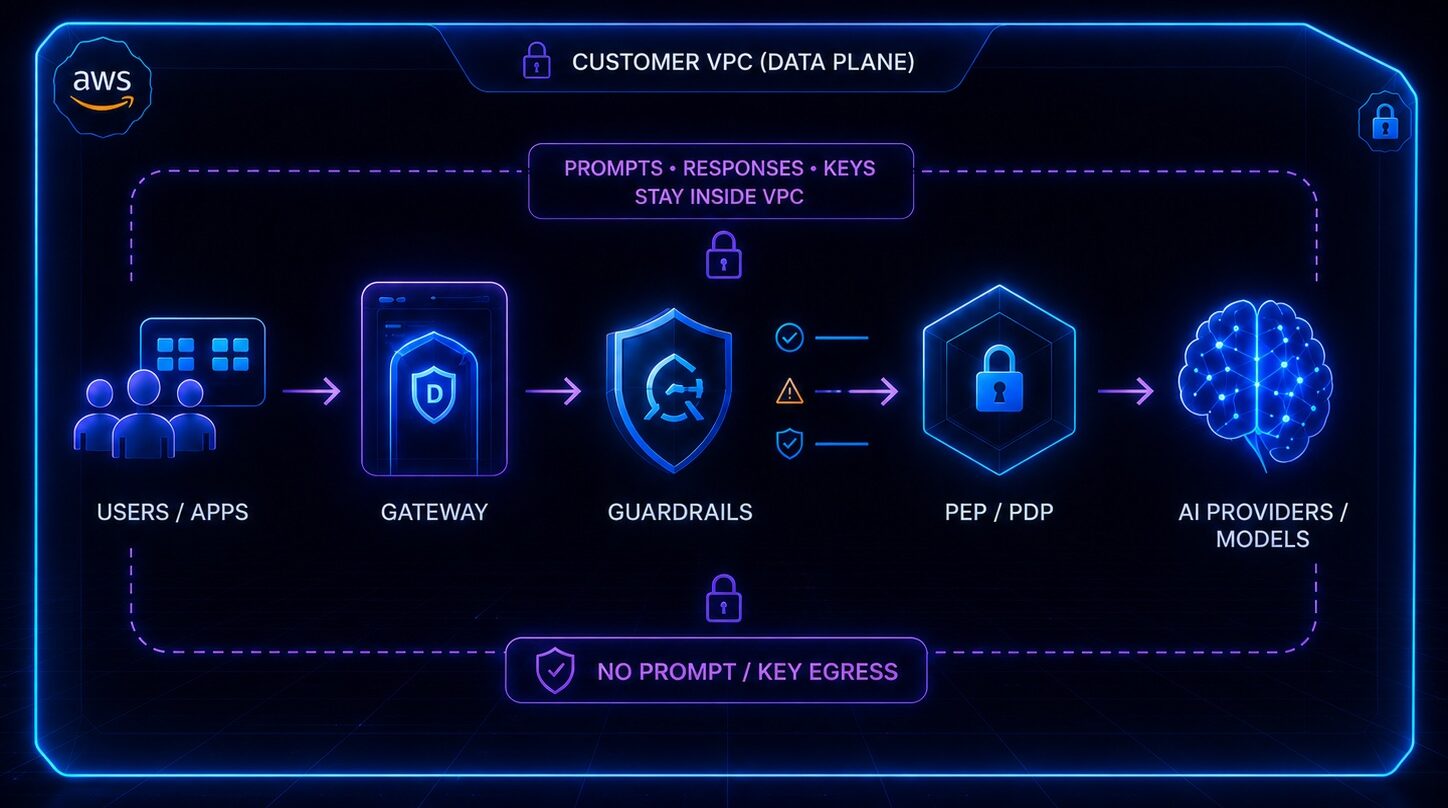
Both planes run in your own cloud, with no call-home and an air-gapped option on Enterprise Self-Hosted.
Explore self-hosted
Compare the three deployment options
All three options run the same gateway, guardrails and agent controls. They differ in who operates each part and where your data stays.
| Fully Managed Cloud | Hybrid Cloud | Self-Hosted | |
|---|---|---|---|
| Control plane | DeepintShield runs it | DeepintShield runs it | You run it |
| Data plane (gateway, guardrails, policy checks) | DeepintShield runs it | You run it in your cloud | You run it in your cloud |
| Where prompts, responses and keys stay | In DeepintShield Cloud, in a region chosen to meet your requirements; zero retention available | In your VPC: no prompt, response, key or audit data leaves | In your environment: no data leaves and nothing calls home |
| Link to DeepintShield | Your apps call the cloud endpoint | One outbound-only link, pinned mutual TLS on port 443 | None required; air-gapped option |
| Set-up effort | None: sign up and change one base URL | One Helm chart in your Kubernetes cluster | Helm chart and Terraform; you run upgrades, scaling and secrets |
| Who it suits | Fast evaluation and teams without strict data-residency rules | Data residency without running the control plane | Teams that must own the full stack, including sovereign and air-gapped sites |
| Plans | Developer (free), Cloud Team ($49 a month), Cloud Business ($249 a month) | Enterprise VPC, from $12,000 a year | Enterprise Self-Hosted, from $24,000 a year |
Prices are in USD and exclude taxes. See pricing for request limits, seats and add-ons.
Hosting location is only part of the data path
A gateway inside your network can still send prompts to an external model provider. Before you choose, draw the path of one request: application, gateway, model provider, retrieval system, log store, backups and telemetry exporters.
In hybrid and self-hosted modes, the gateway, guardrails and policy checks run in your VPC. Model calls go to the providers you configure; a self-hosted runtime such as vLLM, Ollama or SGLang keeps them inside too. The deployment overview in the docs describes each shape.
From evaluation to production
A practical path that tests the deployment you will actually run. Paid pilot fees are credited in full against an order signed within 60 days of the read-out.
Evaluate for free
Start on the managed cloud’s Developer plan with 50,000 requests a month and your own keys.
Pilot where you will run
Run a 30-day Production-Readiness Pilot in your cloud, or a VPC or sovereign validation.
Choose the plan
Pick Cloud Team or Business, Enterprise VPC for hybrid, or Enterprise Self-Hosted.
Go live
Move policies from shadow mode to enforcing and point production traffic at your gateway.
Deployment questions
How long does a hybrid install take?
The install itself is three steps with one Helm chart, and the detectors need about 5 to 10 minutes on first boot. You create a namespace, add the tunnel certificate and seed bundle, then run the installer; the Enterprise VPC guide has the detail.
Does any data leave my environment?
In hybrid and self-hosted modes, no data leaves your environment. In hybrid, only signed configuration comes down and aggregate counts go up over an outbound-only link; in self-hosted mode nothing calls home. See trust and security.
Can we start managed and move later?
Yes, you can start on the managed cloud and move later. Applications use the same OpenAI-compatible API in every mode, so they only need a new base URL; plan the move of policies and keys with our team.
Which clouds can run hybrid and self-hosted deployments?
AWS, Azure and Google Cloud. The hybrid data plane runs on EKS, AKS or GKE with three or more nodes, and self-hosted installs use a Helm chart and Terraform. Plan limits differ by mode; compare them on the plans and features page.
Not sure which mode fits?
Tell us where your data must stay and who will run the platform, and an engineer will map the right option.