Trust & Security
DeepintShield security and trust: how we protect your data
DeepintShield security starts with where your data runs. In hybrid and self-hosted modes, no data leaves your environment; in the managed cloud, the hosting region is chosen to meet your requirements and zero retention is available. This page explains data handling, encryption, access control, audit evidence and how to report a vulnerability.
- 460+ detection patterns, 102 presets plus ML detectors
- Hybrid and self-hosted: no data leaves your environment
- Frameworks are mapped, with no attestation claimed
DeepintShield security by design
Self-hosted by design
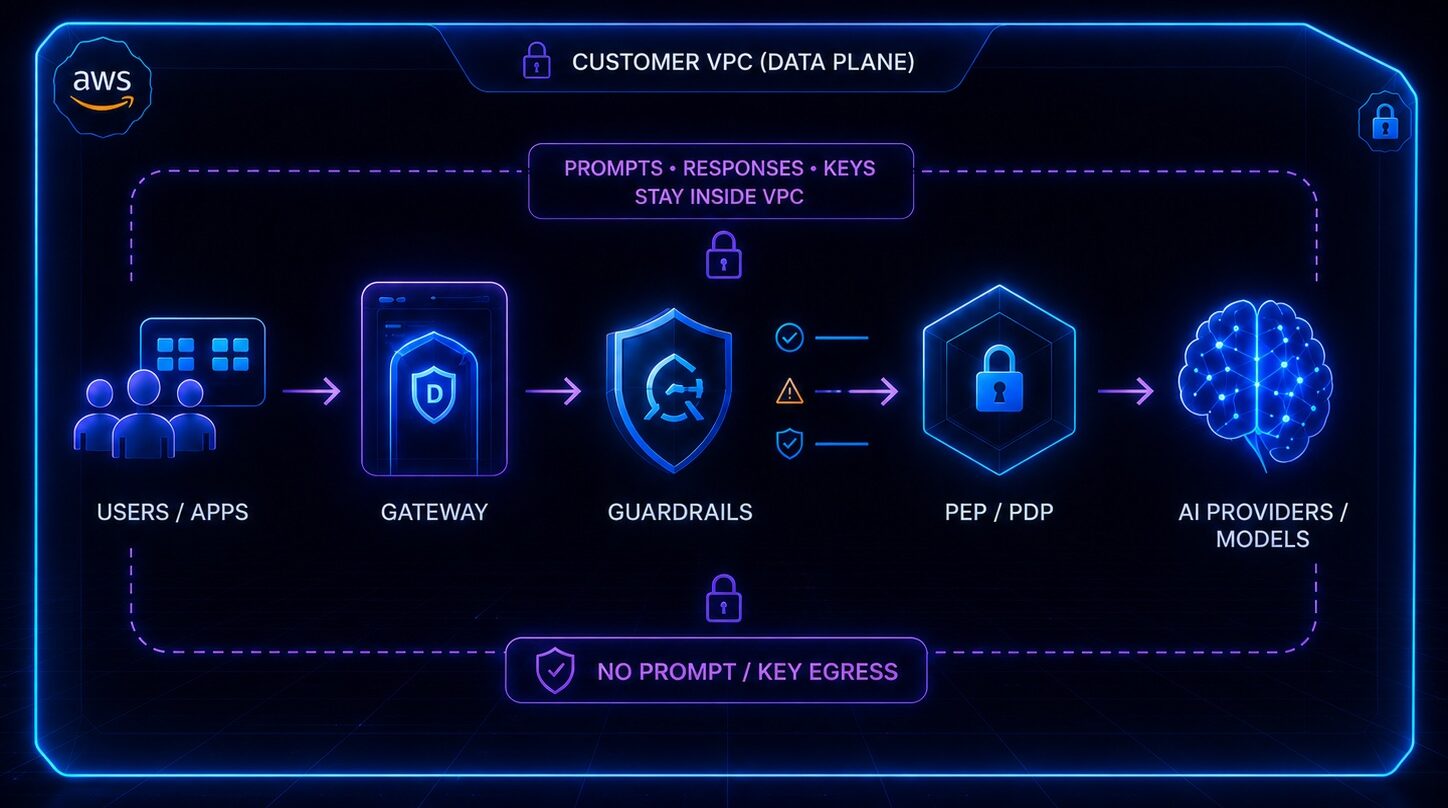
In hybrid and self-hosted modes, your prompts, responses and keys never reach DeepintShield.
Open-source core
The core is published under the Apache License 2.0, so you can inspect the code in your security path.
Open source and benchmarks
No call-home
Self-hosted deployments do not call home, and Enterprise Self-Hosted can run air-gapped.
Data handling in each deployment mode
Fully managed cloud. DeepintShield hosts the control plane and data plane. The cloud is multi-region, and the hosting region is chosen to meet each client’s requirements. Content logging can be switched off, and zero retention is available.
Hybrid. The data plane runs in your VPC. No prompt, response, key or audit data leaves it; signed configuration comes down and aggregate counts go up over one outbound-only link.
Self-hosted. Both planes run in your environment and nothing calls home.
In every mode, model calls go to the providers you configure, with your own keys. The deployment options page compares all three, and the self-hosted page covers air-gapped installs.
Encryption and secrets
- Managed cloud: data is encrypted in transit and at rest.
- Hybrid link: the data plane connects outbound on port 443 with pinned mutual TLS, and configuration from the control plane is signed.
- Your keys: Enterprise VPC deployments take keys from your own KMS.
- Stored connection secrets: in installs you run, MCP connection secrets are encrypted when an encryption key is configured, so set one before production.
- MCP OAuth tokens are encrypted and bound to one workspace.
- Webhooks are delivered over HTTPS only and signed with HMAC-SHA256.
- Secrets found in prompts are stored in findings only as a length hint, never in full, and PII detection runs inside your own deployment.
Access control
Single sign-on uses OIDC with Microsoft Entra ID, Okta, Google Workspace, Auth0 or any OIDC provider, with just-in-time provisioning and e-mail domain restriction. Microsoft Entra ID connections also support SCIM sync.
Multi-factor authentication: native TOTP is available on every plan, including the free plan, with single-use recovery codes.
Roles: Admin and Viewer system roles plus custom roles, with permissions across 14 resources and five operations: view, create, update, delete and download. Roles can sync from your identity provider.
Least privilege for apps and agents: virtual keys limit each application to approved models, budgets and rate limits. When an agent action needs approval, neither the requester nor the agent’s accountable owner can approve it. More on governance.
Audit evidence
Every agent decision is written to a workspace-scoped, append-only, hash-chained ledger before the call proceeds. You can check the chain with Verify chain in the console or through an API. Production deployments need an HMAC key for the chain and refuse to start without one. Evidence is kept for 730 days by default.
The audit log is on by default and records authentication, authorisation, configuration, data-access and security events, such as blocked prompt-injection attempts. Export it as JSON or CSV, schedule log exports to your storage or warehouse, or send OpenTelemetry data, Prometheus metrics and durable webhooks to your own tools. See Observability & Audit.
Sub-processors
For the managed cloud, our list of sub-processors is available on request. Ask for it with the form below or write to support@deepintshield.com.
In hybrid and self-hosted modes, the services in your data path are the ones you choose: your cloud provider, your model providers and any safety provider or telemetry tool you connect.
How we use AI
We do not use customer prompts, responses or files to train models. In hybrid and self-hosted modes we never receive them at all.
Inside the product, pattern checks run locally without network or model calls. Some optional checks do call a model: the helpfulness score in Hallucination Defense makes one extra judge call, and an optional model-based code scan can add findings to an agent review but cannot approve code. If you link an external safety provider such as AWS Bedrock Guardrails, Azure AI Content Safety or Google Model Armor, the content you route to it is processed by that provider.
Frameworks and standards
DeepintShield controls are mapped to the OWASP LLM Top 10, the OWASP Agentic Top 10, NIST AI RMF, ISO/IEC 42001, the EU AI Act and MITRE ATLAS. Agent decisions are classified against the OWASP Agentic Top 10 with crosswalks to the others, and the audit trail helps you gather evidence for SOC 2, GDPR, HIPAA and ISO 27001 reviews.
A mapping is not an attestation. This page does not claim any third-party audit report for DeepintShield as a company; if your review needs one, ask us for the current status. See AI compliance.
Responsible disclosure
If you find a vulnerability in DeepintShield, e-mail support@deepintshield.com with “Security” in the subject line.
What to include
- The affected product, URL or repository path, and version
- Steps to reproduce, with a proof of concept if you have one
- The impact you observed and any data you could reach
- How we can contact you
Rules
- Test only accounts and data that you own
- Do not access, change or delete other people’s data
- No denial-of-service, spam or social engineering
- Give us reasonable time to fix the issue before you publish
Scope
In scope: deepintshield.com, app.deepintshield.com, aidocs.deepintshield.com and the open-source repository on GitHub. Out of scope: third-party services such as model providers.
Response
We reply within one business day to confirm that we have your report, then keep you updated until the issue is resolved.
Request security documents
Ask for architecture and data-flow diagrams, security questionnaire answers or the sub-processor list. Choose the Security topic and tell us what you need; we share documents under NDA.