
AI gateway architecture review pack
What to bring to an architecture review board for DeepintShield: diagrams, data flows per deployment mode, latency, identity and evidence.
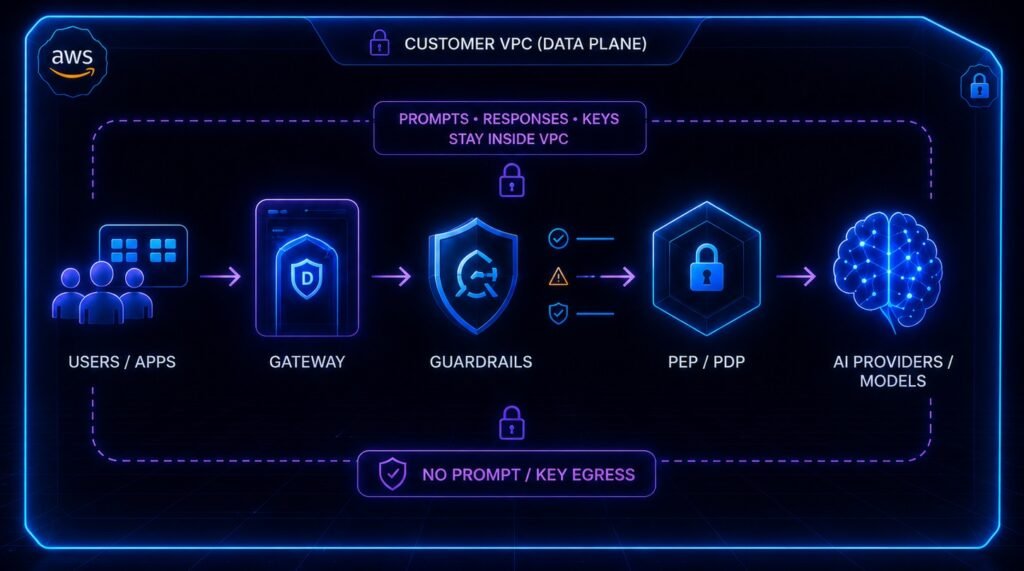
An AI gateway changes the request path of every AI application that uses it, so most organisations take it to an architecture review board. This AI gateway architecture review pack lists what to bring when the gateway is DeepintShield: the diagrams, the data flows for your chosen deployment mode, the mechanisms that keep latency down, the identity design and the evidence the platform produces.
Use it as a template. Copy the headings into your own review document, fill each one for your environment, and attach the test results that back it up. Every figure below comes from the DeepintShield documentation. Where the docs give a benchmark, it is a local measurement, not an end-to-end service level, so measure your own workload with the controls you intend to enable.
The board will want to know three things: where data goes, what happens when something fails, and how decisions can be checked afterwards. The sections below are ordered to answer those questions. For the overall design, start with How It Works.
1. Diagrams to prepare
- System context: applications, agents, the gateway, model providers, MCP servers, identity provider and evidence stores.
- Deployment: where the control plane and data plane run for the chosen mode, with network boundaries and ports.
- Request sequence: one request through the five enforcement stages: Input, RAG, Action, MCP and Output.
- Agent tool call: the decision point, OpenFGA check, approval path and ledger write.
- Data flow register: every destination, what it receives, who operates it and how long data is kept.
2. Data flows per deployment mode
Fully managed cloud
DeepintShield runs the control plane and data plane. Applications call https://app.deepintshield.com with a Virtual Key; provider keys are held on the gateway. The service is multi-region, with the hosting region chosen to meet each client’s requirements, and zero retention is available. See Fully Managed Cloud.
Hybrid (Enterprise VPC)
The data plane runs in your GKE, AKS or EKS cluster; DeepintShield runs the control plane. No prompt, response, key or audit data leaves your VPC. The planes are linked by a single outbound-only, pinned mutual-TLS connection on port 443: signed configuration comes down, aggregate counts go up. If the link drops, the data plane keeps enforcing on its last-known-good configuration. Keys come from your KMS, and installation uses one Helm chart. See Hybrid Cloud.
Self-hosted
Both planes run in your environment, with an air-gapped option through an Enterprise engagement. In hybrid and self-hosted modes, no data leaves your environment. Model calls go only to the providers you configure; for a fully private path, use self-hosted models such as Ollama, vLLM or SGLang. See Self-Hosted.
3. Latency mechanisms
- Embedded guard runtime: on by default, with no separate guard hop.
- Speculative dispatch: on for eligible non-streaming requests, so allow-path latency is max(guards, model) instead of guards + model. On a deny, the provider response is discarded.
- Decision reuse: eligible deterministic guard decisions are reused in about 1.42 µs (local microbenchmark, no I/O).
- Async post-guards: output checks can run after the response, with findings still recorded.
- Per-category timeouts: opt-in budgets per check type, replacing the flat 1,500 ms adapter timeout.
- Semantic cache: available on Team and above when configured, with hits still passing output checks.
4. Identity and access
- Console SSO over OIDC with Microsoft Entra ID, Okta, Google Workspace, Auth0 or any OIDC provider; JIT provisioning; SCIM sync with Entra ID; native TOTP MFA.
- Role-based access with Admin, Viewer and custom roles.
- Applications authenticate with Virtual Keys (
sk-ds-...). - Agents prove identity through Entra Agent ID or generic OIDC; OpenFGA relationship checks down to the record (Business plan and above).
5. Failure behaviour
- Guardrail timeouts fail open by default; set
fail_open: falseto return503 guardrail_runtime_unavailableinstead. - Agent authorisation fails closed: if a decision cannot be made or recorded, the call does not run.
- Provider failures trigger configured fallbacks; a circuit breaker removes failing keys.
6. Evidence
- A workspace-scoped, append-only, hash-chained decision ledger, checked with “Verify chain” in the console and through an API; production needs an HMAC key.
- Audit logs in CADF format, on by default; evidence retention defaults to 730 days.
- Exports through log exports, OpenTelemetry, Prometheus and durable webhooks; an AIBOM signed when a signing key is configured.
Want to walk the board through it? Book a demo or read the Enterprise VPC deployment guide.