
MCP security checklist
Fourteen checks for Model Context Protocol servers and clients: connection, access, execution, content and evidence.
The Model Context Protocol (MCP) gives agents a standard way to discover and call tools. That makes integration easy, and it makes it easy to give a model more access than anyone intended. This MCP security checklist lists fourteen checks for teams running MCP servers and clients in production, grouped by where they apply: connecting servers, controlling access, executing calls, inspecting content and keeping evidence.
Each check is something you can verify with a test or a configuration screen. Where DeepintShield provides the control, the check says how. The MCP registry, Agent Mode and Code Mode are on every plan; Agentic Security, which makes every governed call need an exact Allow, is on the Business plan and above. The number of MCP servers per plan is Developer 1, Team 25, Business 50 and Enterprise unlimited.
One principle runs through the list: discovery is not permission. A tool that appears in a catalogue is available to consider, not authorised to run. Keep those two steps separate, test both, and record which route each call took. For a plain-language introduction, read what an MCP gateway is.
Connecting servers
- Route every client through one gateway. Clients connect to the
/mcpendpoint (JSON-RPC 2.0 and SSE) with a Virtual Key; there is no anonymous access. Remove direct server credentials from client configs. - Authenticate upstream servers properly. Use OAuth 2.1 with PKCE S256, issuer binding and tokens encrypted and bound to the workspace, or HTTP and SSE with headers.
- Encrypt stored secrets. Set
DEEPINTSHIELD_ENCRYPTION_KEY; without it, server secrets are stored as plaintext. - Keep risky transports off. STDIO servers are off in production by default. Outbound URLs are validated and cloud metadata endpoints are refused.
Controlling access
- Give each Virtual Key the smallest tool set. The key’s MCP configuration is the outer boundary: an empty list means no tools, and request headers can narrow the list but never widen it.
- Classify actions yourself. Discovered actions count as write and high risk until an operator classifies them. The server ignores action classes supplied by the caller.
- Use delegated authentication for user context. RFC 8693 token exchange means the caller’s token is not forwarded to the MCP server and is never persisted.
Executing calls
- Require an exact Allow. Executable tools are the intersection of client configuration, the Virtual Key binding and an Agentic authorisation Allow.
tools/call, direct tool execution, Agent Mode and each nested Code Mode call go through the same decision point. - Treat auto-execute lists as eligibility only. In Agent Mode, the auto-execute list is not an authorisation verdict, and a Deny aborts the loop.
- Hold write-like actions for approval. Write-like or unknown actions need a live approval tied to a digest of the arguments, with separation of duties.
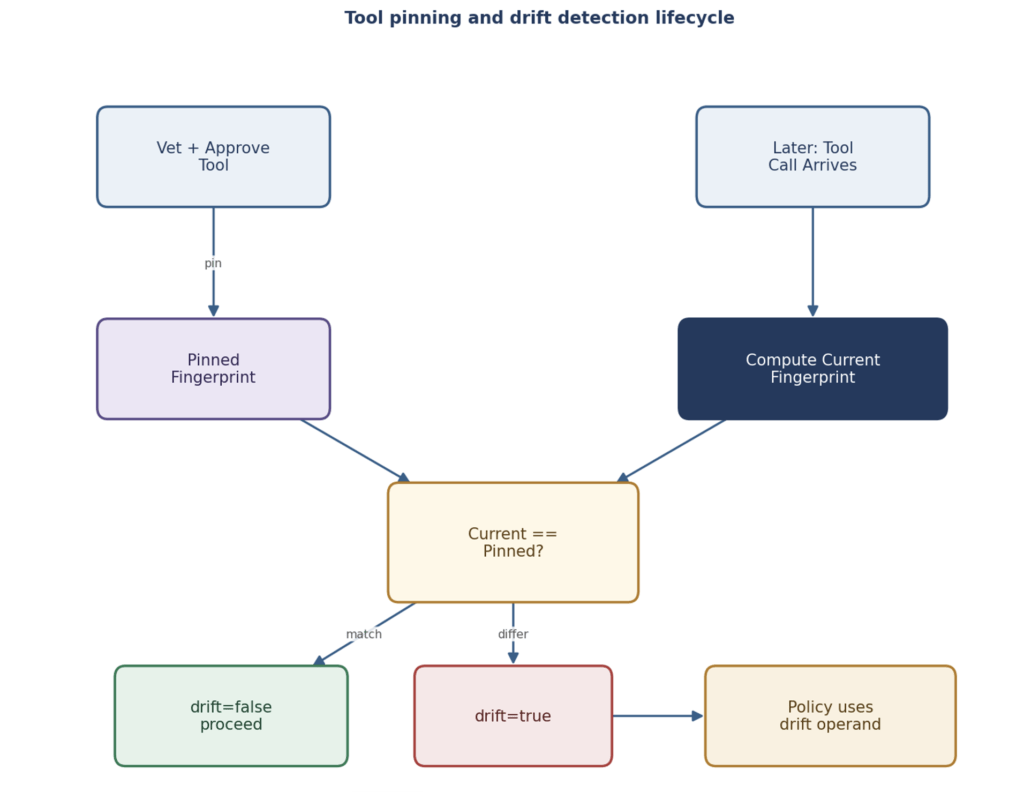
- Pin tool definitions. Approval pins a digest of the name, description and argument schema. A change denies calls until someone selects “Approve new definition”.
Inspecting content
- Check tool arguments and results. Apply guardrails at the MCP stage for personal data, secrets and injection, and treat tool output as data, not instructions. Safety providers such as AWS Bedrock Guardrails, Azure AI Content Safety and Google Model Armor can evaluate live MCP tool calls (Team plan and above).
Keeping evidence
- Record every decision in a keyed chain. Each decision is appended to a hash-chained ledger before the call proceeds. Set
DEEPINTSHIELD_AUDIT_HMAC_KEYso a database writer cannot rebuild the chain. - Export a tool inventory. “Export AIBOM” produces a JSON inventory of governed tool contracts, signed when
DEEPINTSHIELD_AIBOM_SIGNING_SEEDis set. MCP tool logs are also included in log exports.
How to test the checklist
For one server, run six cases: list the tools a key can see, make an allowed read, attempt a restricted write, trigger a pending approval, change a tool description upstream, and disconnect the server. Check that each produced the expected outcome and record. Re-run the cases when the server, SDK or gateway changes.
- Put the checks into practice with how to secure MCP servers.
- See the capability on MCP Gateway.
- Read how tool fingerprint drift is reviewed.
- Read the MCP docs and the tool execution docs.