Stop personal data leaking to LLMs
Detect personal data and secrets in prompts, retrieved chunks, tool calls and answers, then redact or block them inside your own deployment.
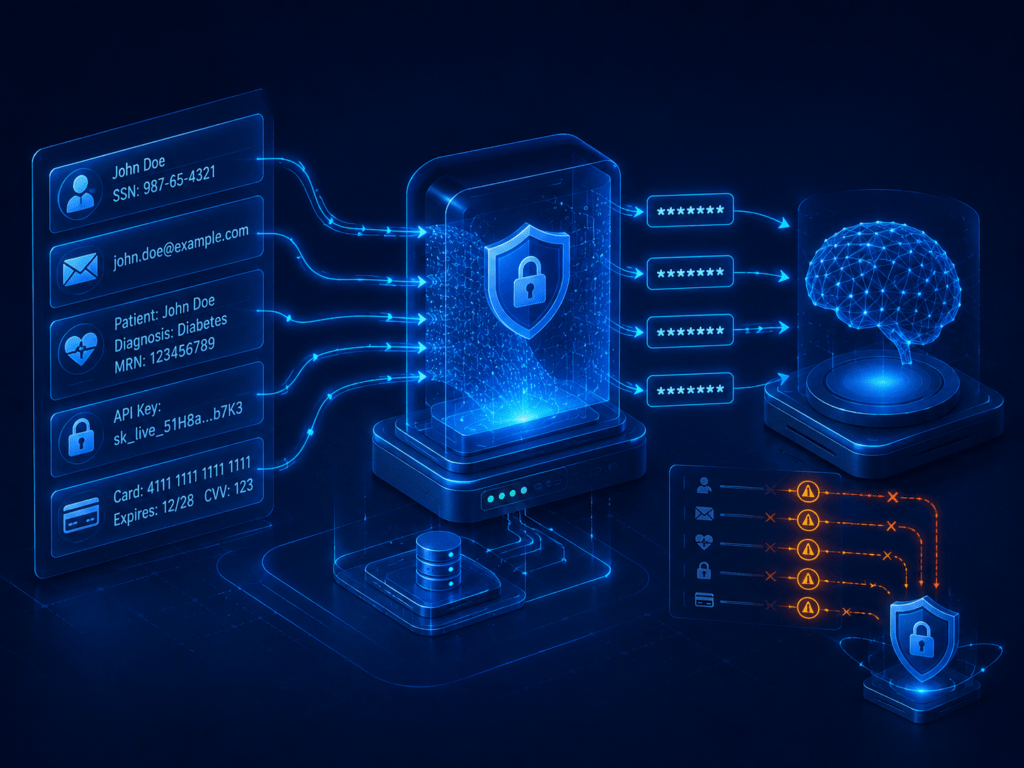
The practical answer to how to stop personal data leaking to LLMs is to redact it before the request leaves your control. DeepintShield detects personal data and secrets in prompts, retrieved chunks, tool calls and responses, then replaces them with [REDACTED] or blocks the request, with detection running inside your own deployment.
The challenge
Personal data reaches language models by many routes, and most of them are not a user typing a national ID number into a chat box:
- Prompts carry pasted records. Staff copy emails, case notes and spreadsheets into assistants to save time.
- Retrieval adds more. A RAG pipeline can pull a document containing patient IDs or bank details into the context without anyone seeing it.
- Tools return raw data. MCP and agent tool results often include full customer rows.
- Answers and logs keep copies. Models repeat what they receive, and logs store both sides of the conversation.
The approach
Check every point where content enters or leaves the model, not only the user prompt. Redact what can be safely rewritten and block what cannot. Store findings without storing the sensitive values themselves. Run detection where the data is allowed to be, so the check itself does not create a new copy elsewhere. Start in monitor mode to see what your real traffic contains, then turn on redaction. Agree with your data protection lead which data types must be redacted, which must block the request, and which only need to be logged.
How to stop personal data leaking to LLMs with DeepintShield
- Turn on the PII and secrets policy. The “Sensitive information disclosure (OWASP LLM02)” card covers email, phone, SSN and credit card numbers, plus API keys, private keys and auth headers. Coverage also includes IP addresses, IBAN, passport numbers, MRN and patient IDs, India PAN and Aadhaar, JWTs, GitHub and Slack tokens, and AWS and Google keys. Add your own patterns with custom secret regex, and use the domain packs for BFSI, healthcare and insurance. See the PII redaction docs.
- Choose an action for each stage. Apply the policy at Input, Output, RAG, MCP and Action. Failure actions are Redact content, Block request, Sandbox or Monitor only, and execution can be sync, shadow or async. Redaction also covers streaming output. If a redaction cannot be mapped back to the message, the request is blocked rather than released unredacted.
- Keep the data where it must stay. Detection runs inside your own deployment. In hybrid and self-hosted modes, no data leaves your environment. Findings store secrets as a length-only hint, and “Disable Content Logging” keeps prompts and responses out of the logs where your rules require it. See the hybrid deployment option.
Know the limits before you rely on the check. Images are checked for metadata only, with no OCR. PDF text is bounded in size. Card numbers are matched at 13 to 19 digits without a Luhn check, so expect some false positives. Multimodal guardrails are off by default.
What you can show afterwards
- Findings by stage and data type, with the action taken: redacted, blocked or flagged.
- The policy version that applied to each request, and which Virtual Key sent it.
- Proof that prompts and responses were or were not stored, from your logging settings.
- Configuration changes in the hash-chained audit log, ready for a data protection review.
To test it, send a prompt with a test card number and a made-up email address, a retrieved chunk with a synthetic patient ID, and a streamed answer that repeats a secret pattern. Confirm each one is redacted or blocked as configured, and that the log records the finding without the value.
For retrieved documents, combine this with per-chunk checks described in the guide to indirect prompt injection.
Related
- Runtime Guardrails & PII: detection, redaction and blocking at five stages
- AI security for healthcare: patient data in prompts and documents
- Secure an internal AI copilot: the wider controls for a staff assistant
- Protect a RAG app from poisoned documents: per-chunk checks on retrieved content